Yep, we may get a tiny thank-you (read: commission) when you buy through
links on Gadgetspotr — not enough for a yacht, but enough to keep the lights (and
servers) on.
Learn more
38
Highlights
58
Differences
9
Reactions
0
Likes
Raise3D Pro2
vs
UltiMaker 3:
38 Highlights & 58 Differences —
So, Which 3D Printer Actually Works Better
Balance your shop floor space against productivity. Learn which footprint suits your environment.
What sets Raise3D Pro2 apart from UltiMaker 3? This 3d printers face-off compares specs like vibration sensor, print log storage, predictive failure logs & weight and beyond.
Raise3D Pro2 vs UltiMaker 3: Professional FDM 3D Printer Showdown
When comparing two standout FDM printers in the professional realm, the Raise3D Pro2 and the UltiMaker 3 both cater to engineers, prototypers, and advanced makers. Each offers dual extrusion, built-in sensors, and multi-material printing capabilities, making them versatile tools for detailed engineering and prototyping workflows. However, these printers differ significantly in their build volume, chamber design, material compatibility, and software ecosystems. The Pro2 impresses with a sizable, enclosed print chamber and the ability to handle exotic composites, while UltiMaker 3 stands out with a compact footprint, higher rated print accuracy, and a proprietary slicing environment optimized for integration.
Raise3D Pro2: Big, Bold, and Built for Versatility
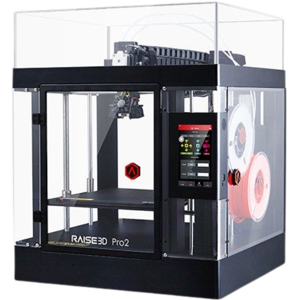
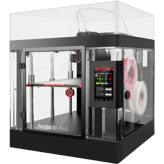
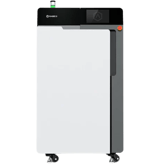
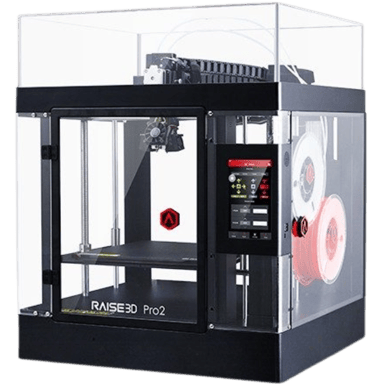
The Raise3D Pro2 is a powerhouse designed for users who demand extensive build capacity and environmental control. Its build volume of 12 x 12 x 11.8 inches (1296.8 cubic inches) dwarfs the UltiMaker 3's footprint, making it ideal for large prototypes or batch printing larger parts. Though it requires more workspace, given its notable 4.6 square feet footprint, this is a tradeoff many professionals are willing to make for scale.
The Pro2's fully enclosed heated chamber reaching up to 140°F ensures stable printing conditions, enabling higher quality prints from challenging materials like ABS, Nylon, and carbon fiber composites. The direct drive dual extruders offer excellent compatibility with flexible materials, complementing its broad filament range from PLA to exotic composites such as wood and carbon fiber.
With a maximum extruder temperature of 572°F and a heated bed peaking at 230°F, it handles heat-sensitive materials more adeptly than many competitors. Its sizeable 7-inch full-color touchscreen increases user interaction and control, while the integrated HEPA and carbon air filtration system ensures a safer workspace; a clear benefit for office environments.
Further enhancing reliability, the Pro2 includes spaghetti and fault detection sensors that pause the print on filament issues; a feature missing in UltiMaker 3. Not to overlook, the Pro2 also leverages advanced linear rail and belt motion systems to boost print smoothness.
UltiMaker 3: Precision and Integration in a Compact Package
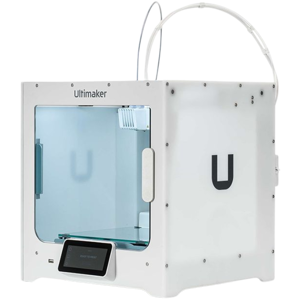
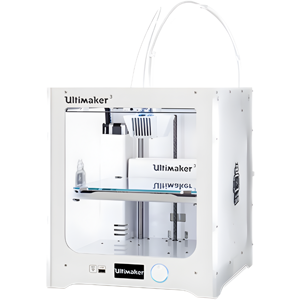
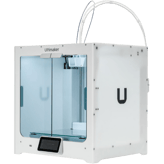
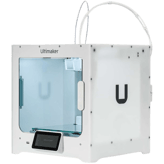
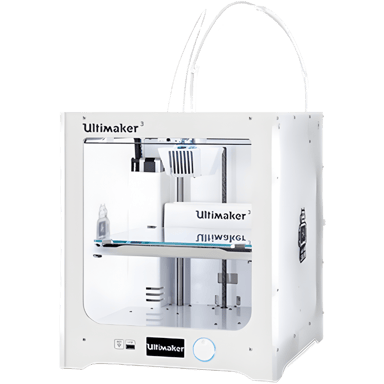
The UltiMaker 3 carves out its niche by delivering exceptional print accuracy and a more space-efficient design. With an incredibly efficient build-to-printer size ratio of 18.3, it fits seamlessly into tight workspaces without compromising on quality. Despite a smaller build volume of 8.46 x 8.46 x 7.87 inches (564.28 cubic inches), it excels when precision is paramount, boasting a superior print accuracy rating of 100, compared to Raise3D Pro2's 10.
UltiMaker adopts Bowden-style extruders with 2.85 mm filament diameter support, contrasting the Pro2's 1.75 mm direct drive system. Though this limits flexible filament compatibility, it suffices for most engineering-grade plastics like PLA, ABS, and PC, balanced with a maximum nozzle temperature capped at 536°F. It features an open frame without a heated chamber but incorporates a glass build plate for excellent surface finish.
The printer's smaller, 2.8-inch non-touchscreen display contrasts with the Pro2's touchscreen, yet it is paired with a highly refined proprietary slicing software - Cura. This software offers deep API/SDK integration, making it especially appealing for users seeking advanced customizations and multi-printer management in an enterprise setting.
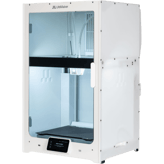
Additionally, UltiMaker 3 is quieter at idle (45 dB vs. 50 dB) and more energy efficient thanks to an energy-saving mode. It also complies with air quality standards, an edge in office safety. The machine supports routine maintenance reminders and includes upgrade options to expand with multi-material and enclosure kits, catering well to evolving workflow needs.
Quick Take
The Raise3D Pro2 shines with its expansive build volume, heated and enclosed chamber, and compatibility with a wide array of advanced materials, making it perfect for users who need industrial-level versatility and durability. Meanwhile, the UltiMaker 3 appeals to professionals demanding top-notch precision, efficient use of space, and seamless software integration within quieter and energy-conscious environments.
Bottom Line Recommendation
If your projects require large-scale parts, advanced composites like carbon fiber, or a tightly controlled environment for reliable printing, the Raise3D Pro2 is clearly the superior choice. Conversely, if your priorities are pinpoint accuracy, space-saving design, and strong software ecosystem support, the UltiMaker 3 remains an excellent option that fits well in offices and labs with tighter space and noise requirements.
Verdict
Winner: Raise3D Pro2 => Larger build volume, heated enclosed chamber, more filament options, and better environmental filtration make it the ultimate choice for demanding professional applications.
Runner-up: UltiMaker 3 => Compact size, superior print accuracy, efficient power usage, and sophisticated Cura-based software make it the ideal pick for precise and quiet prototyping in smaller spaces.
The Raise3D Pro2 being a professional level prebuilt machine right out of the box suits experienced users better as it requires no assembly unlike some 3D printers that need more setup time.
Package Height is 39.4 inch for Raise3D Pro2 and only 18 inch for UltiMaker 3, making Product A more cumbersome to transport.
Height of the printer’s packaging.
In the battle of Package Height,
Raise3D Pro2 ◉ is
worse than
UltiMaker 3 ◉
, delivering
higher
21.4 inch
measurement.
Don’t keep it to yourself — be the first to react and review the
Package Height on Raise3D Pro2 ◉
vs UltiMaker 3 ◉ and help others decide!
Height
What is the printer’s height?
29.9
inch
0Votes
23.15
inch
0Votes
Raise3D Pro2
The total height of the printer is 29.9 inches (75.9 cm). This measurement is important for considering desk space or placement within an enclosure.
The total external height of the printer.
In the battle of Height,
Raise3D Pro2 ◉ is
worse than
UltiMaker 3 ◉
, delivering
higher
6.8 inch
measurement.
Don’t keep it to yourself — be the first to react and review the
Height on Raise3D Pro2 ◉
vs UltiMaker 3 ◉ and help others decide!
Package Width
What is the package width?
30.3
inch
0Votes
24
inch
0Votes
Raise3D Pro2
The package width is 30.3 inches (77.0 cm), which is important for logistical planning and ensuring adequate space for delivery and unpacking.
Width of the printer’s packaging.
In the battle of Package Width,
Raise3D Pro2 ◉ is
worse than
UltiMaker 3 ◉
, delivering
higher
6.3 inch
measurement.
Don’t keep it to yourself — be the first to react and review the
Package Width on Raise3D Pro2 ◉
vs UltiMaker 3 ◉ and help others decide!
Package Weight
What is the package weight?
141.1
lbs
0Votes
34.1
lbs
0Votes
Raise3D Pro2
The package has a total weight of 141.1 lbs (64.0 kg). This weight is important for shipping and handling considerations.
total shipping weight including packaging.
In the battle of Package Weight,
Raise3D Pro2 ◉ is
worse than
UltiMaker 3 ◉
, delivering
higher
107.0 lbs
measurement.
Don’t keep it to yourself — be the first to react and review the
Package Weight on Raise3D Pro2 ◉
vs UltiMaker 3 ◉ and help others decide!
Space Requirement
What is the space requirement?
4.6
sq ft
0Votes
1.4
sq ft
0Votes
Raise3D Pro2
The printer requires approximately 4.6 square feet (0.43 m²) of space for placement and operation. This footprint should be considered for installation.
The minimum flat surface area needed to safely place the printer.
In the battle of Space Requirement,
Raise3D Pro2 ◉ is
worse than
UltiMaker 3 ◉
, delivering
higher
3.2 sq ft
measurement.
Don’t keep it to yourself — be the first to react and review the
Space Requirement on Raise3D Pro2 ◉
vs UltiMaker 3 ◉ and help others decide!
Width
What is the printer’s width?
24.4
inch
0Votes
19.9
inch
0Votes
The total external width of the printer.
In the battle of Width,
Raise3D Pro2 ◉ is
worse than
UltiMaker 3 ◉
, delivering
higher
4.5 inch
measurement.
Don’t keep it to yourself — be the first to react and review the
Width on Raise3D Pro2 ◉
vs UltiMaker 3 ◉ and help others decide!
Depth
What is the printer’s depth?
23.2
inch
0Votes
13.31
inch
0Votes
The total external depth of the printer.
In the battle of Depth,
Raise3D Pro2 ◉ is
worse than
UltiMaker 3 ◉
, delivering
higher
9.9 inch
measurement.
Don’t keep it to yourself — be the first to react and review the
Depth on Raise3D Pro2 ◉
vs UltiMaker 3 ◉ and help others decide!
Folded Width
What is the folded width?
Who knows?
0Votes
Raise3D Pro2
(Help us out by suggesting one!)
Who knows?
0Votes
UltiMaker 3
(Help us out by suggesting one!)
Width of the printer when folded (if applicable).
Don’t keep it to yourself — be the first to react and review the
Folded Width on Raise3D Pro2 ◉
vs UltiMaker 3 ◉ and help others decide!
Folded Depth
What is the folded depth?
Who knows?
0Votes
Raise3D Pro2
(Help us out by suggesting one!)
Who knows?
0Votes
UltiMaker 3
(Help us out by suggesting one!)
Depth of the printer when folded.
Don’t keep it to yourself — be the first to react and review the
Folded Depth on Raise3D Pro2 ◉
vs UltiMaker 3 ◉ and help others decide!
Build-to-Printer Size Ratio
What is the build-to-printer size ratio?
Who knows?
0Votes
Raise3D Pro2
(Help us out by suggesting one!)
18.3
%
0Votes
The efficiency ratio of build volume relative to the overall printer size.
Don’t keep it to yourself — be the first to react and review the
Build-to-Printer Size Ratio on Raise3D Pro2 ◉
vs UltiMaker 3 ◉ and help others decide!
Both printers operate on similar voltage but having an internal power supply like the Raise3D Pro2 simplifies setup and reduces cable clutter compared to the external power supply on the UltiMaker 3.
From a power consumption standpoint the UltiMaker 3 is more efficient at 221 watts max compared to the Raise3D Pro2's 600 watts, which matters if you print a lot and want to keep energy costs down.
See more
Operating Temperature Range
What is the operating temperature range?
0
Raise3D Pro2
0Votes
59-86°F
0
UltiMaker 3
0Votes
59-86°F
Raise3D Pro2
The printer operates optimally within a temperature range of 59-86°F (15-30°C). Maintaining this environment helps ensure consistent print quality and printer longevity.
Recommended ambient temperature range for safe operation.
In the battle of Operating Temperature Range,
Raise3D Pro2 ◉ is
same as
UltiMaker 3 ◉
.
Don’t keep it to yourself — be the first to react and review the
Operating Temperature Range on Raise3D Pro2 ◉
vs UltiMaker 3 ◉ and help others decide!
Operating Humidity Range
What is the operating humidity range?
0
Raise3D Pro2
0Votes
10-90%
0
UltiMaker 3
0Votes
10-90%
UltiMaker 3
The printer operates reliably within a humidity range of 10-90%, indicating its suitability for various environmental conditions.
Acceptable humidity range during printer operation.
In the battle of Operating Humidity Range,
Raise3D Pro2 ◉ is
same as
UltiMaker 3 ◉
.
Don’t keep it to yourself — be the first to react and review the
Operating Humidity Range on Raise3D Pro2 ◉
vs UltiMaker 3 ◉ and help others decide!
Storage Humidity Range
What is the storage humidity range?
0
Raise3D Pro2
0Votes
10-90%
0
UltiMaker 3
0Votes
10-90%
Safe humidity range for storing the printer.
In the battle of Storage Humidity Range,
Raise3D Pro2 ◉ is
same as
UltiMaker 3 ◉
.
Don’t keep it to yourself — be the first to react and review the
Storage Humidity Range on Raise3D Pro2 ◉
vs UltiMaker 3 ◉ and help others decide!
Idle Power Consumption
What is the idle power consumption?
75
Watt
0Votes
25
Watt
0Votes
Power drawn while the printer is on but not printing.
In the battle of Idle Power Consumption,
Raise3D Pro2 ◉ is
worse than
UltiMaker 3 ◉
, delivering
higher
50.0 Watt
measurement.
Don’t keep it to yourself — be the first to react and review the
Idle Power Consumption on Raise3D Pro2 ◉
vs UltiMaker 3 ◉ and help others decide!
I appreciate the larger build volume of the Raise3D Pro2 as it allows for printing bigger projects without splitting the model which the UltiMaker 3 can't handle as well with its substantially smaller 564.28 cubic inches.
It's cool that the Raise3D Pro2 lets you print down to 250 microns max layer thickness for faster coarse printing, slightly higher than the UltiMaker 3's 200 microns which might limit speedy rough prints.
I prefer the Raise3D Pro2's direct drive extruder as it generally handles flexible filaments better while the UltiMaker 3 uses a Bowden extruder which is less ideal for soft materials.
Independent Dual Extruder is not available for either printer.
Whether the printer supports independent extruder heads.
In the battle of Independent Dual Extruder,
Raise3D Pro2 ◉ is
same as
UltiMaker 3 ◉
.
Don’t keep it to yourself — be the first to react and review the
Independent Dual Extruder on Raise3D Pro2 ◉
vs UltiMaker 3 ◉ and help others decide!
Build Depth
What is the build depth?
12
inch
0Votes
8.46
inch
0Votes
Raise3D Pro2
The build depth measures 12 inches (30.5 cm), contributing to the overall print volume and capacity for larger designs.
UltiMaker 3
The build depth, or Y-axis dimension, of the print area is 8.46 inches (approximately 21.49 cm).
Maximum printable depth of the build area.
In the battle of Build Depth,
Raise3D Pro2 ◉ is
better than
UltiMaker 3 ◉
, delivering
higher
3.5 inch
measurement.
Don’t keep it to yourself — be the first to react and review the
Build Depth on Raise3D Pro2 ◉
vs UltiMaker 3 ◉ and help others decide!
Max Extruder Temperature
What is the max extruder temperature?
572
°F
0Votes
536
°F
0Votes
Raise3D Pro2
The maximum extruder temperature this printer can reach is 572°F (300°C). This high temperature capability allows for printing with engineering-grade filaments.
UltiMaker 3
The maximum extruder temperature reaches 536 °F (280 °C), enabling the use of a wide range of thermoplastic filaments, including high-temperature engineering materials.
Maximum heating capability of extruder.
In the battle of Max Extruder Temperature,
Raise3D Pro2 ◉ is
better than
UltiMaker 3 ◉
, delivering
higher
36.0 °F
measurement.
Don’t keep it to yourself — be the first to react and review the
Max Extruder Temperature on Raise3D Pro2 ◉
vs UltiMaker 3 ◉ and help others decide!
Layer Resolution Minimum
What is the minimum layer resolution?
10
microns
1Votes
20
microns
0Votes
Raise3D Pro2
The minimum layer resolution is 10 microns (0.01 mm), allowing for incredibly fine details and smooth surface finishes on printed objects.
Finest layer height achievable.
In the battle of Layer Resolution Minimum,
Raise3D Pro2 ◉ is
better than
UltiMaker 3 ◉
, delivering
lower
10.0 microns
measurement.
Based on community votes for Layer Resolution Minimum,
Raise3D Pro2 ◉ earned
1 votes,
more than
UltiMaker 3 ◉,
which got 0 votes.
The Raise3D Pro2 offers a finer minimum layer resolution at 10 microns which really helps with detailed prints whereas the UltiMaker 3 has a minimum of 20 microns making this a clear win for the Pro2.
See more
Build Height
What is the build height?
11.8
inch
0Votes
7.87
inch
0Votes
Raise3D Pro2
The maximum build height is 11.8 inches (29.97 cm), enabling the creation of tall objects.
Maximum printable height of the build area.
In the battle of Build Height,
Raise3D Pro2 ◉ is
better than
UltiMaker 3 ◉
, delivering
higher
3.9 inch
measurement.
Don’t keep it to yourself — be the first to react and review the
Build Height on Raise3D Pro2 ◉
vs UltiMaker 3 ◉ and help others decide!
Standard Nozzle Diameter
What is the standard nozzle diameter?
0.4
mm
0Votes
0.4
mm
0Votes
UltiMaker 3
The standard nozzle diameter is 0.4 mm, a common size that provides a good balance between print speed and detail for most applications.
Default nozzle diameter provided.
In the battle of Standard Nozzle Diameter,
Raise3D Pro2 ◉ is
same as
UltiMaker 3 ◉
, delivering
equal
0.40 mm
measurement.
Don’t keep it to yourself — be the first to react and review the
Standard Nozzle Diameter on Raise3D Pro2 ◉
vs UltiMaker 3 ◉ and help others decide!
Number of Extruders
How many extruders does the printer have?
0
Raise3D Pro2
0Votes
2
0
UltiMaker 3
0Votes
2
Raise3D Pro2
The printer is equipped with 2 extruders, allowing for multi-material or multi-color printing, or printing with dedicated support material.
total extruders installed.
In the battle of Number of Extruders,
Raise3D Pro2 ◉ is
same as
UltiMaker 3 ◉
.
Don’t keep it to yourself — be the first to react and review the
Number of Extruders on Raise3D Pro2 ◉
vs UltiMaker 3 ◉ and help others decide!
Hotend Replaceable
Is the hotend replaceable?
Yes
0Votes
Raise3D Pro2
Yes
0Votes
UltiMaker 3
UltiMaker 3
The hotend is replaceable, allowing for easy servicing or upgrading of the crucial component responsible for melting filament.
Whether the hotend can be replaced.
In the battle of Hotend Replaceable,
Raise3D Pro2 ◉ is
same as
UltiMaker 3 ◉
.
Don’t keep it to yourself — be the first to react and review the
Hotend Replaceable on Raise3D Pro2 ◉
vs UltiMaker 3 ◉ and help others decide!
Filament Diameter Supported
What filament diameter is supported?
1.75
mm
0Votes
2.85
mm
0Votes
The filament size compatible with printer.
In the battle of Filament Diameter Supported,
Raise3D Pro2 ◉ is
worse than
UltiMaker 3 ◉
, delivering
lower
1.1 mm
measurement.
Don’t keep it to yourself — be the first to react and review the
Filament Diameter Supported on Raise3D Pro2 ◉
vs UltiMaker 3 ◉ and help others decide!
Max Bed Temperature
What is the max bed temperature?
230
°F
0Votes
212
°F
0Votes
Maximum heated bed temperature.
In the battle of Max Bed Temperature,
Raise3D Pro2 ◉ is
better than
UltiMaker 3 ◉
, delivering
higher
18.0 °F
measurement.
Don’t keep it to yourself — be the first to react and review the
Max Bed Temperature on Raise3D Pro2 ◉
vs UltiMaker 3 ◉ and help others decide!
Chamber Temperature Control Range
What is the chamber temperature control range?
0
Raise3D Pro2
0Votes
Up to 140°F
Who knows?
0Votes
UltiMaker 3
(Help us out by suggesting one!)
Range of temperatures the printer chamber can maintain
Don’t keep it to yourself — be the first to react and review the
Chamber Temperature Control Range on Raise3D Pro2 ◉
vs UltiMaker 3 ◉ and help others decide!
Dual Extruders
Does it support dual extruders?
Yes
0Votes
Raise3D Pro2
Yes
0Votes
UltiMaker 3
Indicates if printer can run dual extruders.
In the battle of Dual Extruders,
Raise3D Pro2 ◉ is
same as
UltiMaker 3 ◉
.
Don’t keep it to yourself — be the first to react and review the
Dual Extruders on Raise3D Pro2 ◉
vs UltiMaker 3 ◉ and help others decide!
Who knows?
0Votes
Raise3D Pro2
(Help us out by suggesting one!)
Who knows?
0Votes
UltiMaker 3
(Help us out by suggesting one!)
Light wavelength compatibility for curing resins.
Don’t keep it to yourself — be the first to react and review the
Compatible Resin Wavelength on Raise3D Pro2 ◉
vs UltiMaker 3 ◉ and help others decide!
The printer supports a broad range of filament types, including PLA, ABS, HIPS, PC, TPU, TPE, PETG, ASA, PP, Nylon, Carbon Fiber, and Wood, enabling versatility for various applications.
Filament materials that the printer can process.
In the battle of Supported Filament Types,
Raise3D Pro2 ◉ is
same as
UltiMaker 3 ◉
.
Don’t keep it to yourself — be the first to react and review the
Supported Filament Types on Raise3D Pro2 ◉
vs UltiMaker 3 ◉ and help others decide!
Max Supported Filament Diameter
What is the maximum supported filament diameter?
1.75
mm
0Votes
2.85
mm
0Votes
UltiMaker 3
The maximum supported filament diameter is 2.85 mm, which is the standard filament size for UltiMaker printers.
Maximum filament diameter that can be used.
In the battle of Max Supported Filament Diameter,
Raise3D Pro2 ◉ is
worse than
UltiMaker 3 ◉
, delivering
lower
1.1 mm
measurement.
Don’t keep it to yourself — be the first to react and review the
Max Supported Filament Diameter on Raise3D Pro2 ◉
vs UltiMaker 3 ◉ and help others decide!
Filament Auto-Loading
Does it have filament auto-loading?
No
0Votes
Raise3D Pro2
No
0Votes
UltiMaker 3
Raise3D Pro2
This printer does not feature automatic filament loading. Filament spools must be loaded manually before starting a print.
Automatic feeding of filament into extruder.
In the battle of Filament Auto-Loading,
Raise3D Pro2 ◉ is
same as
UltiMaker 3 ◉
.
Don’t keep it to yourself — be the first to react and review the
Filament Auto-Loading on Raise3D Pro2 ◉
vs UltiMaker 3 ◉ and help others decide!
Max Number of Materials Supported
What is the maximum number of materials supported?
0
Raise3D Pro2
0Votes
2
0
UltiMaker 3
0Votes
2
UltiMaker 3
This printer supports a maximum of 2 different materials during a single print job, enabling multi-color or multi-material prints.
Maximum distinct materials supported in one job.
In the battle of Max Number of Materials Supported,
Raise3D Pro2 ◉ is
same as
UltiMaker 3 ◉
.
Don’t keep it to yourself — be the first to react and review the
Max Number of Materials Supported on Raise3D Pro2 ◉
vs UltiMaker 3 ◉ and help others decide!
Biocompatible Materials Support
Does it support biocompatible materials?
Yes
0Votes
Raise3D Pro2
Yes
0Votes
UltiMaker 3
Raise3D Pro2
The printer supports biocompatible materials, making it suitable for applications where printed parts need to interact safely with biological systems, such as medical prototypes or prosthetics.
Supports resins/filaments approved for medical or dental use.
In the battle of Biocompatible Materials Support,
Raise3D Pro2 ◉ is
same as
UltiMaker 3 ◉
.
Don’t keep it to yourself — be the first to react and review the
Biocompatible Materials Support on Raise3D Pro2 ◉
vs UltiMaker 3 ◉ and help others decide!
Filament Drying Required
Is filament drying required?
Yes
0Votes
Raise3D Pro2
Yes
0Votes
UltiMaker 3
Whether drying filament before use is necessary.
In the battle of Filament Drying Required,
Raise3D Pro2 ◉ is
same as
UltiMaker 3 ◉
.
Don’t keep it to yourself — be the first to react and review the
Filament Drying Required on Raise3D Pro2 ◉
vs UltiMaker 3 ◉ and help others decide!
Multi-Material Printing
Can it print with multiple materials?
Yes
0Votes
Raise3D Pro2
Yes
0Votes
UltiMaker 3
Ability to print with multiple materials simultaneously.
In the battle of Multi-Material Printing,
Raise3D Pro2 ◉ is
same as
UltiMaker 3 ◉
.
Don’t keep it to yourself — be the first to react and review the
Multi-Material Printing on Raise3D Pro2 ◉
vs UltiMaker 3 ◉ and help others decide!
Third-Party Material
Does it support third-party materials?
Yes
0Votes
Raise3D Pro2
Yes
0Votes
UltiMaker 3
Ability to use non-proprietary materials.
In the battle of Third-Party Material,
Raise3D Pro2 ◉ is
same as
UltiMaker 3 ◉
.
Don’t keep it to yourself — be the first to react and review the
Third-Party Material on Raise3D Pro2 ◉
vs UltiMaker 3 ◉ and help others decide!
Supported Resin Types
What resin types are supported?
0
Raise3D Pro2
0Votes
None
0
UltiMaker 3
0Votes
None
Resin types that the printer can use.
In the battle of Supported Resin Types,
Raise3D Pro2 ◉ is
same as
UltiMaker 3 ◉
.
Don’t keep it to yourself — be the first to react and review the
Supported Resin Types on Raise3D Pro2 ◉
vs UltiMaker 3 ◉ and help others decide!
Resin Auto-Fill
Does it have resin auto-fill?
No
0Votes
Raise3D Pro2
No
0Votes
UltiMaker 3
Automatic filling of resin during prints.
In the battle of Resin Auto-Fill,
Raise3D Pro2 ◉ is
same as
UltiMaker 3 ◉
.
Don’t keep it to yourself — be the first to react and review the
Resin Auto-Fill on Raise3D Pro2 ◉
vs UltiMaker 3 ◉ and help others decide!
I think the Raise3D Pro2's use of PEI for print adhesion is more reliable and easier to work with than the UltiMaker 3's glue surface, which can get messy and needs reapplication.
Who knows?
0Votes
Raise3D Pro2
(Help us out by suggesting one!)
Who knows?
0Votes
UltiMaker 3
(Help us out by suggesting one!)
Rated score for overall print quality (0–10).
Don’t keep it to yourself — be the first to react and review the
Print Quality Rating on Raise3D Pro2 ◉
vs UltiMaker 3 ◉ and help others decide!
Print Recovery
Does the printer support print recovery?
Yes
0Votes
Raise3D Pro2
Yes
0Votes
UltiMaker 3
Raise3D Pro2
The printer supports print recovery features, allowing it to resume a print job after an interruption such as a power outage or filament runout.
Ability to resume print after power loss or interruption.
In the battle of Print Recovery,
Raise3D Pro2 ◉ is
same as
UltiMaker 3 ◉
.
Don’t keep it to yourself — be the first to react and review the
Print Recovery on Raise3D Pro2 ◉
vs UltiMaker 3 ◉ and help others decide!
Operating Noise Level
What is the operating noise level?
50
dB
0Votes
50
dB
0Votes
UltiMaker 3
During operation, the printer generates a noise level of 50 dB, which is comparable to ambient office sounds.
Measures the sound generated during printing; lower is quieter.
In the battle of Operating Noise Level,
Raise3D Pro2 ◉ is
same as
UltiMaker 3 ◉
, delivering
equal
50.00 dB
measurement.
Don’t keep it to yourself — be the first to react and review the
Operating Noise Level on Raise3D Pro2 ◉
vs UltiMaker 3 ◉ and help others decide!
Measured Effective Print Speed
What is the effective measured print speed?
Who knows?
0Votes
Raise3D Pro2
(Help us out by suggesting one!)
50
mm/s
0Votes
Independently measured real-world print speed.
Don’t keep it to yourself — be the first to react and review the
Measured Effective Print Speed on Raise3D Pro2 ◉
vs UltiMaker 3 ◉ and help others decide!
Bridging Performance
What is the bridging performance?
Who knows?
0Votes
Raise3D Pro2
(Help us out by suggesting one!)
50
mm
0Votes
Longest unsupported horizontal span printed without sagging.
Don’t keep it to yourself — be the first to react and review the
Bridging Performance on Raise3D Pro2 ◉
vs UltiMaker 3 ◉ and help others decide!
Overhang Performance
What is the overhang performance?
Who knows?
0Votes
Raise3D Pro2
(Help us out by suggesting one!)
60
degrees
0Votes
Maximum angle of unsupported overhangs achievable.
Don’t keep it to yourself — be the first to react and review the
Overhang Performance on Raise3D Pro2 ◉
vs UltiMaker 3 ◉ and help others decide!
Spaghetti/Fault Detection
Does it have spaghetti or fault detection?
Yes
0Votes
Raise3D Pro2
No
0Votes
UltiMaker 3
Detects failed prints or filament tangles.
In the battle of Spaghetti/Fault Detection,
Raise3D Pro2 ◉ is
better than
UltiMaker 3 ◉
.
Don’t keep it to yourself — be the first to react and review the
Spaghetti/Fault Detection on Raise3D Pro2 ◉
vs UltiMaker 3 ◉ and help others decide!
Print Success Rate
What is the print success rate?
Who knows?
0Votes
Raise3D Pro2
(Help us out by suggesting one!)
95
%
0Votes
Percentage of prints successfully completed.
Don’t keep it to yourself — be the first to react and review the
Print Success Rate on Raise3D Pro2 ◉
vs UltiMaker 3 ◉ and help others decide!
Idle Noise Level
What is the idle noise level?
50
dB
0Votes
45
dB
0Votes
Measures the noise when printer is on but not printing; lower is better.
In the battle of Idle Noise Level,
Raise3D Pro2 ◉ is
worse than
UltiMaker 3 ◉
, delivering
higher
5.0 dB
measurement.
Don’t keep it to yourself — be the first to react and review the
Idle Noise Level on Raise3D Pro2 ◉
vs UltiMaker 3 ◉ and help others decide!
Having a touchscreen display on the Raise3D Pro2 makes it really user friendly and modern looking unlike the UltiMaker 3 which doesn't have one and that can slow down interactions a bit.
Whether the toolhead can be swapped for other functions.
In the battle of Toolhead Modularity,
Raise3D Pro2 ◉ is
same as
UltiMaker 3 ◉
.
Don’t keep it to yourself — be the first to react and review the
Toolhead Modularity on Raise3D Pro2 ◉
vs UltiMaker 3 ◉ and help others decide!
Filament Runout Sensor
Does it have a filament runout sensor?
Yes
0Votes
Raise3D Pro2
Yes
0Votes
UltiMaker 3
Raise3D Pro2
A filament runout sensor is included, which automatically pauses the print when filament runs out, preventing failed prints and allowing for easy material replacement.
UltiMaker 3
A filament runout sensor is integrated, which automatically pauses the print if the filament runs out, preventing failed prints and saving material.
Detects when filament runs out and pauses printing.
In the battle of Filament Runout Sensor,
Raise3D Pro2 ◉ is
same as
UltiMaker 3 ◉
.
Don’t keep it to yourself — be the first to react and review the
Filament Runout Sensor on Raise3D Pro2 ◉
vs UltiMaker 3 ◉ and help others decide!
Built-in Camera
Does it have a built-in camera?
Yes
0Votes
Raise3D Pro2
Yes
0Votes
UltiMaker 3
Raise3D Pro2
A built-in camera allows for remote monitoring of print progress, offering convenience and the ability to intervene if issues arise.
Camera for monitoring prints and creating time-lapses.
In the battle of Built-in Camera,
Raise3D Pro2 ◉ is
same as
UltiMaker 3 ◉
.
Don’t keep it to yourself — be the first to react and review the
Built-in Camera on Raise3D Pro2 ◉
vs UltiMaker 3 ◉ and help others decide!
Lighting Inside Chamber
Does it have chamber lighting?
Yes
0Votes
Raise3D Pro2
Yes
0Votes
UltiMaker 3
UltiMaker 3
The print chamber is equipped with internal lighting, providing clear visibility of the printing process for monitoring and inspection.
Chamber lighting to monitor prints in progress.
In the battle of Lighting Inside Chamber,
Raise3D Pro2 ◉ is
same as
UltiMaker 3 ◉
.
Don’t keep it to yourself — be the first to react and review the
Lighting Inside Chamber on Raise3D Pro2 ◉
vs UltiMaker 3 ◉ and help others decide!
Build Plate Surface Texture
What is the build plate texture?
0
Raise3D Pro2
0Votes
Smooth
0
UltiMaker 3
0Votes
Smooth
UltiMaker 3
The build plate features a Smooth surface texture, commonly preferred for achieving glossy finishes on the bottom of 3D prints.
Surface finish of the build plate.
In the battle of Build Plate Surface Texture,
Raise3D Pro2 ◉ is
same as
UltiMaker 3 ◉
.
Don’t keep it to yourself — be the first to react and review the
Build Plate Surface Texture on Raise3D Pro2 ◉
vs UltiMaker 3 ◉ and help others decide!
Auto Bed Leveling
Does it support auto bed leveling?
Yes
0Votes
Raise3D Pro2
Yes
0Votes
UltiMaker 3
Raise3D Pro2
The printer features automatic bed leveling, which greatly simplifies setup and ensures a perfect first layer adhesion without manual adjustment.
Automatic calibration of the print bed.
In the battle of Auto Bed Leveling,
Raise3D Pro2 ◉ is
same as
UltiMaker 3 ◉
.
Don’t keep it to yourself — be the first to react and review the
Auto Bed Leveling on Raise3D Pro2 ◉
vs UltiMaker 3 ◉ and help others decide!
Power Loss Recovery
Does it support power loss recovery?
Yes
0Votes
Raise3D Pro2
Yes
0Votes
UltiMaker 3
Raise3D Pro2
Power loss recovery enables the printer to resume a print job from where it left off after an unexpected power interruption, saving material and time.
Recovers print jobs after power interruptions.
In the battle of Power Loss Recovery,
Raise3D Pro2 ◉ is
same as
UltiMaker 3 ◉
.
Don’t keep it to yourself — be the first to react and review the
Power Loss Recovery on Raise3D Pro2 ◉
vs UltiMaker 3 ◉ and help others decide!
Motion System
What is the motion system?
0
Raise3D Pro2
0Votes
Linear Rails, Belts
0
UltiMaker 3
0Votes
Belts, Rods
UltiMaker 3
The printer's motion system utilizes Belts and Rods for precise movement of the print head, ensuring accuracy and reliability.
Mechanical motion system guiding the print head.
In the battle of Motion System,
Raise3D Pro2 ◉ is
same as
UltiMaker 3 ◉
.
Don’t keep it to yourself — be the first to react and review the
Motion System on Raise3D Pro2 ◉
vs UltiMaker 3 ◉ and help others decide!
Frame Type
What is the frame type?
0
Raise3D Pro2
0Votes
Cartesian
0
UltiMaker 3
0Votes
Cartesian
Mechanical structure style of the printer.
In the battle of Frame Type,
Raise3D Pro2 ◉ is
same as
UltiMaker 3 ◉
.
Don’t keep it to yourself — be the first to react and review the
Frame Type on Raise3D Pro2 ◉
vs UltiMaker 3 ◉ and help others decide!
Enclosure
Is the printer open or enclosed?
0
Raise3D Pro2
0Votes
Closed
0
UltiMaker 3
0Votes
Open
Whether the printer has an open or enclosed build chamber.
In the battle of Enclosure,
Raise3D Pro2 ◉ is
same as
UltiMaker 3 ◉
.
Don’t keep it to yourself — be the first to react and review the
Enclosure on Raise3D Pro2 ◉
vs UltiMaker 3 ◉ and help others decide!
Screen Resolution
What is the display resolution?
0
Raise3D Pro2
0Votes
800x480p
0
UltiMaker 3
0Votes
320x240p
Resolution of the display screen.
In the battle of Screen Resolution,
Raise3D Pro2 ◉ is
same as
UltiMaker 3 ◉
.
Don’t keep it to yourself — be the first to react and review the
Screen Resolution on Raise3D Pro2 ◉
vs UltiMaker 3 ◉ and help others decide!
Screen Size
What is the display screen size?
7
Inch
0Votes
2.8
Inch
0Votes
Size of the display screen.
In the battle of Screen Size,
Raise3D Pro2 ◉ is
better than
UltiMaker 3 ◉
, delivering
higher
4.2 Inch
measurement.
Don’t keep it to yourself — be the first to react and review the
Screen Size on Raise3D Pro2 ◉
vs UltiMaker 3 ◉ and help others decide!
Chamber Lighting Color Modes
What chamber lighting modes are available?
0
Raise3D Pro2
0Votes
White
0
UltiMaker 3
0Votes
White
Options for chamber lighting colors.
In the battle of Chamber Lighting Color Modes,
Raise3D Pro2 ◉ is
same as
UltiMaker 3 ◉
.
Don’t keep it to yourself — be the first to react and review the
Chamber Lighting Color Modes on Raise3D Pro2 ◉
vs UltiMaker 3 ◉ and help others decide!
Build Plate Removable
Is the build plate removable?
Yes
0Votes
Raise3D Pro2
Yes
0Votes
UltiMaker 3
Whether the build plate can be detached for print removal.
In the battle of Build Plate Removable,
Raise3D Pro2 ◉ is
same as
UltiMaker 3 ◉
.
Don’t keep it to yourself — be the first to react and review the
Build Plate Removable on Raise3D Pro2 ◉
vs UltiMaker 3 ◉ and help others decide!
Whether use of manufacturer’s software is mandatory.
In the battle of Proprietary Software Required,
Raise3D Pro2 ◉ is
better than
UltiMaker 3 ◉
.
Don’t keep it to yourself — be the first to react and review the
Proprietary Software Required on Raise3D Pro2 ◉
vs UltiMaker 3 ◉ and help others decide!
In the battle of Multi-Printer Fleet Control,
Raise3D Pro2 ◉ is
same as
UltiMaker 3 ◉
.
Don’t keep it to yourself — be the first to react and review the
Multi-Printer Fleet Control on Raise3D Pro2 ◉
vs UltiMaker 3 ◉ and help others decide!
Type of UV light source used to cure resin layers.
In the battle of UV Light Source Type,
Raise3D Pro2 ◉ is
same as
UltiMaker 3 ◉
.
Don’t keep it to yourself — be the first to react and review the
UV Light Source Type on Raise3D Pro2 ◉
vs UltiMaker 3 ◉ and help others decide!
UV Power Output
What is the UV power output?
Who knows?
0Votes
Raise3D Pro2
(Help us out by suggesting one!)
Who knows?
0Votes
UltiMaker 3
(Help us out by suggesting one!)
Strength of UV light exposure affecting curing speed and accuracy.
Don’t keep it to yourself — be the first to react and review the
UV Power Output on Raise3D Pro2 ◉
vs UltiMaker 3 ◉ and help others decide!
Resin Layer Curing Speed
What is the resin layer curing speed?
Who knows?
0Votes
Raise3D Pro2
(Help us out by suggesting one!)
Who knows?
0Votes
UltiMaker 3
(Help us out by suggesting one!)
Time required to cure one resin layer.
Don’t keep it to yourself — be the first to react and review the
Resin Layer Curing Speed on Raise3D Pro2 ◉
vs UltiMaker 3 ◉ and help others decide!
Resin Tank Lifetime
What is the resin tank lifetime?
Who knows?
0Votes
Raise3D Pro2
(Help us out by suggesting one!)
Who knows?
0Votes
UltiMaker 3
(Help us out by suggesting one!)
Approximate number of prints before resin tank replacement.
Don’t keep it to yourself — be the first to react and review the
Resin Tank Lifetime on Raise3D Pro2 ◉
vs UltiMaker 3 ◉ and help others decide!
Resin Cartridge System
Does it use a resin cartridge system?
No
0Votes
Raise3D Pro2
No
0Votes
UltiMaker 3
Whether it uses a sealed resin cartridge system for easy handling.
In the battle of Resin Cartridge System,
Raise3D Pro2 ◉ is
same as
UltiMaker 3 ◉
.
Don’t keep it to yourself — be the first to react and review the
Resin Cartridge System on Raise3D Pro2 ◉
vs UltiMaker 3 ◉ and help others decide!
Auto Resin Mixing
Does it have auto resin mixing?
No
0Votes
Raise3D Pro2
No
0Votes
UltiMaker 3
Whether resin is automatically mixed during operation for consistency.
In the battle of Auto Resin Mixing,
Raise3D Pro2 ◉ is
same as
UltiMaker 3 ◉
.
Don’t keep it to yourself — be the first to react and review the
Auto Resin Mixing on Raise3D Pro2 ◉
vs UltiMaker 3 ◉ and help others decide!
Resin Heating System
Does it have a resin heating system?
No
0Votes
Raise3D Pro2
No
0Votes
UltiMaker 3
Whether the printer can heat resin for optimal viscosity.
In the battle of Resin Heating System,
Raise3D Pro2 ◉ is
same as
UltiMaker 3 ◉
.
Don’t keep it to yourself — be the first to react and review the
Resin Heating System on Raise3D Pro2 ◉
vs UltiMaker 3 ◉ and help others decide!
Wash Time
What is the wash time?
Who knows?
0Votes
Raise3D Pro2
(Help us out by suggesting one!)
Who knows?
0Votes
UltiMaker 3
(Help us out by suggesting one!)
Typical duration to wash prints in post-processing.
Don’t keep it to yourself — be the first to react and review the
Wash Time on Raise3D Pro2 ◉
vs UltiMaker 3 ◉ and help others decide!
Cure Time
What is the cure time?
Who knows?
0Votes
Raise3D Pro2
(Help us out by suggesting one!)
Who knows?
0Votes
UltiMaker 3
(Help us out by suggesting one!)
Typical duration to fully cure resin prints after washing.
Don’t keep it to yourself — be the first to react and review the
Cure Time on Raise3D Pro2 ◉
vs UltiMaker 3 ◉ and help others decide!
Post-Processing Equipment Compatibility
Is it compatible with post-processing equipment?
No
0Votes
Raise3D Pro2
No
0Votes
UltiMaker 3
Whether the printer supports integration with wash/cure stations.
In the battle of Post-Processing Equipment Compatibility,
Raise3D Pro2 ◉ is
same as
UltiMaker 3 ◉
.
Don’t keep it to yourself — be the first to react and review the
Post-Processing Equipment Compatibility on Raise3D Pro2 ◉
vs UltiMaker 3 ◉ and help others decide!
Who knows?
0Votes
UltiMaker 3
(Help us out by suggesting one!)
Number of safety sensors installed in the printer.
Don’t keep it to yourself — be the first to react and review the
Safety Sensors Count on Raise3D Pro2 ◉
vs UltiMaker 3 ◉ and help others decide!
Fireproof Build Plate
Does it have a fireproof build plate?
No
0Votes
Raise3D Pro2
No
0Votes
UltiMaker 3
Raise3D Pro2
The build plate does not feature specific fireproof construction. Users should always follow safety guidelines and monitor the printer during operation to prevent fire hazards.
Build plate is resistant to fire for extra safety.
In the battle of Fireproof Build Plate,
Raise3D Pro2 ◉ is
same as
UltiMaker 3 ◉
.
Don’t keep it to yourself — be the first to react and review the
Fireproof Build Plate on Raise3D Pro2 ◉
vs UltiMaker 3 ◉ and help others decide!
Safety Certifications
What safety certifications does it have?
0
Raise3D Pro2
0Votes
CE, FCC
0
UltiMaker 3
0Votes
CE, FCC
Official safety standards the printer complies with.
In the battle of Safety Certifications,
Raise3D Pro2 ◉ is
same as
UltiMaker 3 ◉
.
Don’t keep it to yourself — be the first to react and review the
Safety Certifications on Raise3D Pro2 ◉
vs UltiMaker 3 ◉ and help others decide!
Emergency Stop Button
Does it have an emergency stop button?
No
0Votes
Raise3D Pro2
No
0Votes
UltiMaker 3
Dedicated button to stop the printer instantly in emergencies.
In the battle of Emergency Stop Button,
Raise3D Pro2 ◉ is
same as
UltiMaker 3 ◉
.
Don’t keep it to yourself — be the first to react and review the
Emergency Stop Button on Raise3D Pro2 ◉
vs UltiMaker 3 ◉ and help others decide!
Auto Shutdown on Error
Does it auto shut down on errors?
Yes
0Votes
Raise3D Pro2
Yes
0Votes
UltiMaker 3
Shuts printer down automatically when critical errors occur.
In the battle of Auto Shutdown on Error,
Raise3D Pro2 ◉ is
same as
UltiMaker 3 ◉
.
Don’t keep it to yourself — be the first to react and review the
Auto Shutdown on Error on Raise3D Pro2 ◉
vs UltiMaker 3 ◉ and help others decide!
Resin Spill Protection
Does it have resin spill protection?
No
0Votes
Raise3D Pro2
No
0Votes
UltiMaker 3
Prevents or contains resin leaks in resin printers.
In the battle of Resin Spill Protection,
Raise3D Pro2 ◉ is
same as
UltiMaker 3 ◉
.
Don’t keep it to yourself — be the first to react and review the
Resin Spill Protection on Raise3D Pro2 ◉
vs UltiMaker 3 ◉ and help others decide!
Child Lock Mode
Does it have a child lock mode?
No
0Votes
Raise3D Pro2
No
0Votes
UltiMaker 3
A setting that prevents unauthorized or unsafe use by children.
In the battle of Child Lock Mode,
Raise3D Pro2 ◉ is
same as
UltiMaker 3 ◉
.
Don’t keep it to yourself — be the first to react and review the
Child Lock Mode on Raise3D Pro2 ◉
vs UltiMaker 3 ◉ and help others decide!
Predictive Maintenance Alerts are not present on either printer.
Predicts potential failures and alerts the user before issues arise.
In the battle of Predictive Maintenance Alerts,
Raise3D Pro2 ◉ is
same as
UltiMaker 3 ◉
.
Don’t keep it to yourself — be the first to react and review the
Predictive Maintenance Alerts on Raise3D Pro2 ◉
vs UltiMaker 3 ◉ and help others decide!
Nozzle Replaceable
Is the nozzle replaceable?
Yes
0Votes
Raise3D Pro2
Yes
0Votes
UltiMaker 3
Specifies if the nozzle can be replaced with different sizes or when worn.
In the battle of Nozzle Replaceable,
Raise3D Pro2 ◉ is
same as
UltiMaker 3 ◉
.
Don’t keep it to yourself — be the first to react and review the
Nozzle Replaceable on Raise3D Pro2 ◉
vs UltiMaker 3 ◉ and help others decide!
Supported Mod Kits
What mod kits are supported?
0
Raise3D Pro2
0Votes
Enclosure
0
UltiMaker 3
0Votes
Enclosure, Multi-Material
Officially supported modification kits.
In the battle of Supported Mod Kits,
Raise3D Pro2 ◉ is
same as
UltiMaker 3 ◉
.
Don’t keep it to yourself — be the first to react and review the
Supported Mod Kits on Raise3D Pro2 ◉
vs UltiMaker 3 ◉ and help others decide!
Self-Diagnostics
Does it have self-diagnostics?
Yes
0Votes
Raise3D Pro2
Yes
0Votes
UltiMaker 3
Printer can analyze itself for common faults and errors.
In the battle of Self-Diagnostics,
Raise3D Pro2 ◉ is
same as
UltiMaker 3 ◉
.
Don’t keep it to yourself — be the first to react and review the
Self-Diagnostics on Raise3D Pro2 ◉
vs UltiMaker 3 ◉ and help others decide!
Service Interval
What is the service interval?
2,000
hours
0Votes
2,000
hours
0Votes
Recommended time between major servicing.
In the battle of Service Interval,
Raise3D Pro2 ◉ is
same as
UltiMaker 3 ◉
, delivering
equal
2,000.00 hours
measurement.
Don’t keep it to yourself — be the first to react and review the
Service Interval on Raise3D Pro2 ◉
vs UltiMaker 3 ◉ and help others decide!
SLA & Support Contracts are offered by both, ensuring professional service.
Option for service-level agreements and premium support contracts.
In the battle of SLA & Support Contracts,
Raise3D Pro2 ◉ is
same as
UltiMaker 3 ◉
.
Don’t keep it to yourself — be the first to react and review the
SLA & Support Contracts on Raise3D Pro2 ◉
vs UltiMaker 3 ◉ and help others decide!
Multi-User Profiles
Does it support multi-user profiles?
Yes
0Votes
Raise3D Pro2
Yes
0Votes
UltiMaker 3
UltiMaker 3
Multi-user profiles are supported, enabling different users to customize and save their individual settings and preferences for a personalized printing experience.
Allows multiple users to have distinct profiles and permissions.
In the battle of Multi-User Profiles,
Raise3D Pro2 ◉ is
same as
UltiMaker 3 ◉
.
Don’t keep it to yourself — be the first to react and review the
Multi-User Profiles on Raise3D Pro2 ◉
vs UltiMaker 3 ◉ and help others decide!
Remote Access Control
Does it support remote access control?
Yes
0Votes
Raise3D Pro2
Yes
0Votes
UltiMaker 3
UltiMaker 3
Remote access control is available, allowing users to control and monitor the printer from a different location via a network connection.
Ability to control printer access remotely with permissions.
In the battle of Remote Access Control,
Raise3D Pro2 ◉ is
same as
UltiMaker 3 ◉
.
Don’t keep it to yourself — be the first to react and review the
Remote Access Control on Raise3D Pro2 ◉
vs UltiMaker 3 ◉ and help others decide!
Usage Analytics Dashboard
Does it include a usage analytics dashboard?
Yes
0Votes
Raise3D Pro2
Yes
0Votes
UltiMaker 3
UltiMaker 3
A usage analytics dashboard is available, providing valuable insights into printer performance, material consumption, and operational efficiency.
Provides usage statistics and analytics for tracking productivity and costs.
In the battle of Usage Analytics Dashboard,
Raise3D Pro2 ◉ is
same as
UltiMaker 3 ◉
.
Don’t keep it to yourself — be the first to react and review the
Usage Analytics Dashboard on Raise3D Pro2 ◉
vs UltiMaker 3 ◉ and help others decide!
Predictive Cost Estimation
Does it have predictive cost estimation?
Yes
0Votes
Raise3D Pro2
Yes
0Votes
UltiMaker 3
UltiMaker 3
The system offers predictive cost estimation, helping users anticipate material and energy expenses for print jobs before they begin.
Estimates printing costs (material, power, time) before job start.
In the battle of Predictive Cost Estimation,
Raise3D Pro2 ◉ is
same as
UltiMaker 3 ◉
.
Don’t keep it to yourself — be the first to react and review the
Predictive Cost Estimation on Raise3D Pro2 ◉
vs UltiMaker 3 ◉ and help others decide!
Workflow Integration
Does it integrate with workflows?
Yes
0Votes
Raise3D Pro2
Yes
0Votes
UltiMaker 3
Integration with professional workflow tools and design platforms.
In the battle of Workflow Integration,
Raise3D Pro2 ◉ is
same as
UltiMaker 3 ◉
.
Don’t keep it to yourself — be the first to react and review the
Workflow Integration on Raise3D Pro2 ◉
vs UltiMaker 3 ◉ and help others decide!
Enterprise Security Features
Does it have enterprise security features?
Yes
0Votes
Raise3D Pro2
Yes
0Votes
UltiMaker 3
Advanced security measures like encryption, secure login, and permissions.
In the battle of Enterprise Security Features,
Raise3D Pro2 ◉ is
same as
UltiMaker 3 ◉
.
Don’t keep it to yourself — be the first to react and review the
Enterprise Security Features on Raise3D Pro2 ◉
vs UltiMaker 3 ◉ and help others decide!
Chamber Temperature Sensors exist only on Raise3D Pro2, enhancing environment awareness.
Tracks and maintains chamber temperature for consistent prints.
In the battle of Chamber Temperature Sensors,
Raise3D Pro2 ◉ is
better than
UltiMaker 3 ◉
.
Don’t keep it to yourself — be the first to react and review the
Chamber Temperature Sensors on Raise3D Pro2 ◉
vs UltiMaker 3 ◉ and help others decide!
 Supermod
 Moderator


 Recaptor
 0
Cartling
0
Cartling